AI Muscle Photo Editor · iOS · Android
See yourself shredded before you train.
Upload any photo. Pick the body parts. Pick the look - fit, muscular, or bodybuilder. Muscle Editor adds realistic abs, chest, arms, back and full-body muscle in seconds. Free to start.
- 7 muscle groups
- 3 intensity levels
- Realistic AI render
- Before / after compare
- Save & share
- Free to start
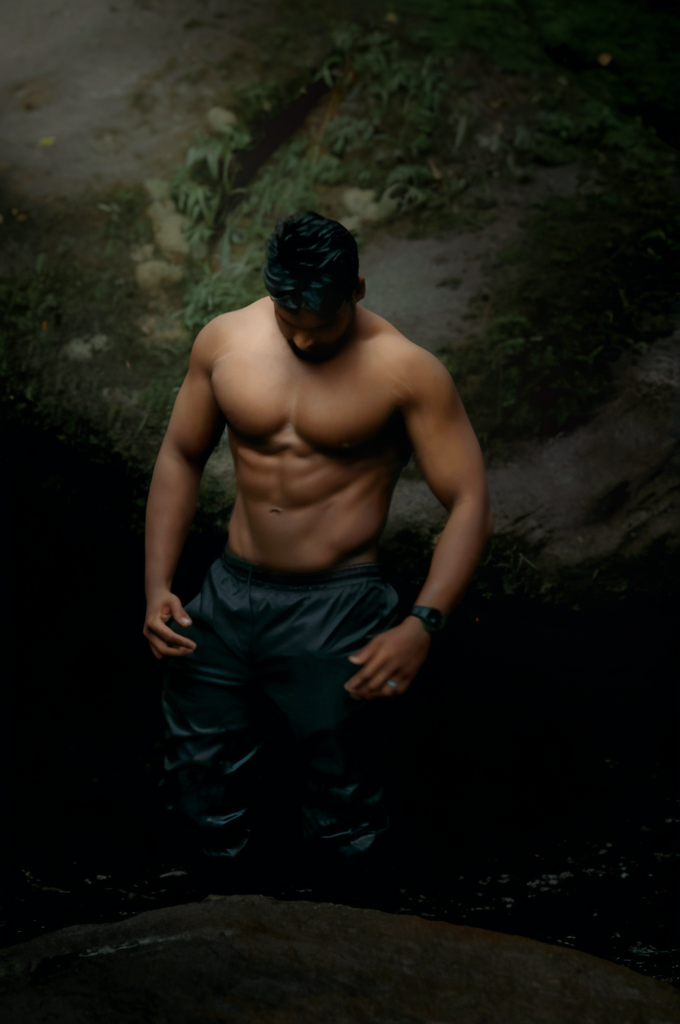
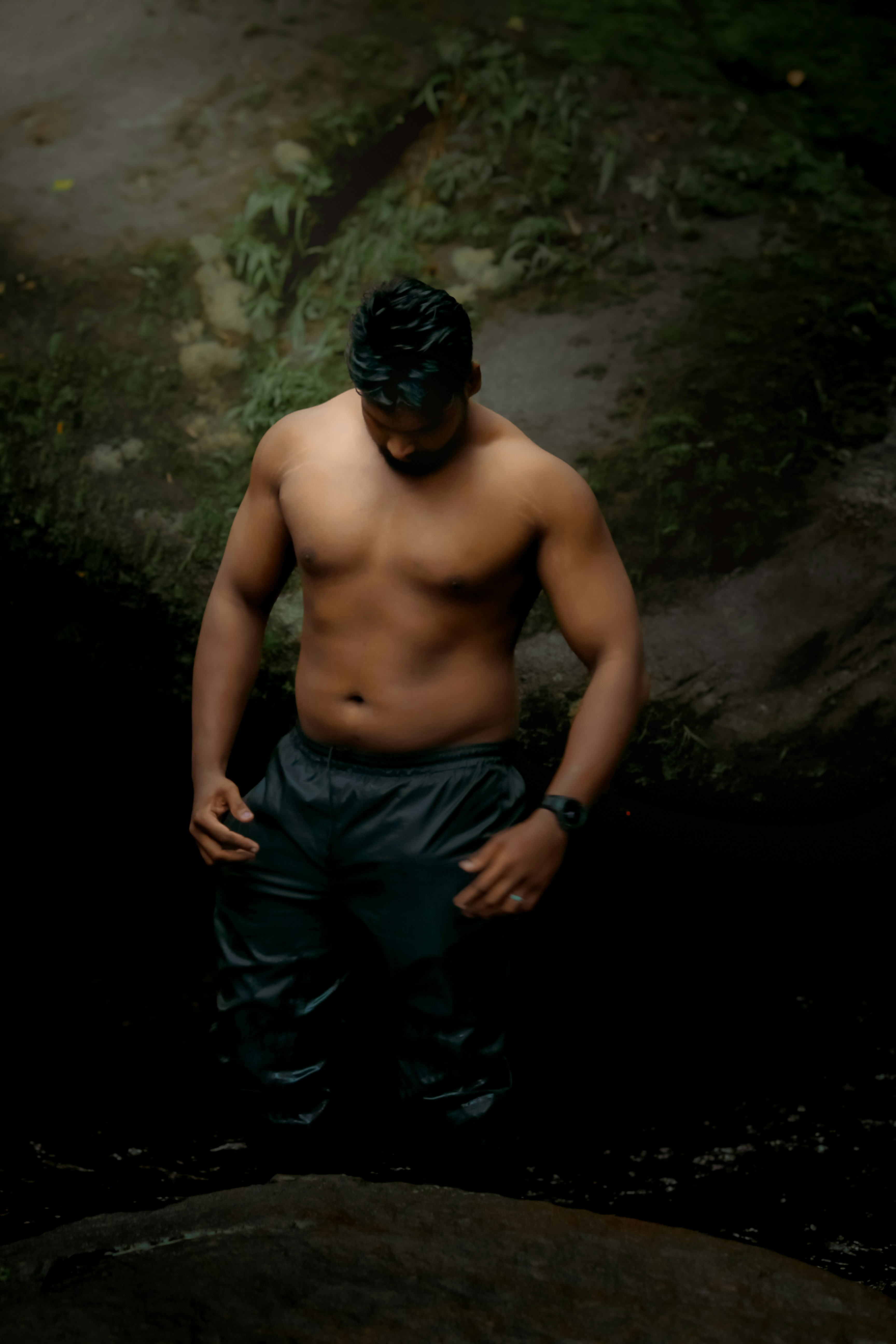
Add a defined six-pack with realistic shadow and skin tone.
GeneratedHow it works
From phone photo to shredded preview - in four taps.
No Photoshop, no liquify, no editing skill. Just upload, choose, and generate.
- 01
Upload a photo
Pick any clear photo of yourself - shirtless, gym mirror, beach, t-shirt - or shoot one in the app. Front-on works best.
- 02
Pick body parts
Tap the muscle groups to edit: abs, chest, arms, back, shoulders, legs, glutes. Combine up to three at once.
- 03
Choose your look
Three intensity levels - Fit, Muscular, or Bodybuilder. Want lean and athletic, or full-blown competition shape? Your call.
- 04
Generate & share
AI renders the result in seconds. Compare before/after, save in HD, share to your camera roll, or post straight to social.
Features
Everything you need to visualize the goal - in your pocket
-
AI Muscle Generator
A purpose-built model that adds realistic abs, chest, arms, back, shoulders, glutes, and legs - matching your body type, lighting, and pose.
-
Fit · Muscular · Bodybuilder
Three intensity presets per muscle group. Athletic and lean, gym-strong, or full competition shape - dial in the look you actually want.
-
Multi-area edit in one tap
Combine up to three body parts in a single render. Stack abs + chest + arms - or go full-body. The AI keeps every transition seamless.
-
Before / After compare
Drag the slider on every result to see exactly what changed. Save and share the comparison or just the after.
-
HD export
Premium upscale to crisp HD resolution - ready for Instagram, TikTok, your gym story, or your dating profile.
-
Result history
Every render saves to your private history. Re-edit, iterate, and stack styles without re-uploading the original photo.
Muscle groups
Edit any body part. Pick your intensity.
Seven muscle groups, three intensity levels, infinite combinations - all in the same app.
-
Abs
Add a realistic six-pack, eight-pack, or lean athletic mid-section to any photo.
FitMuscularBodybuilderEdit abs → -
Chest
Build muscular pecs, a defined upper-chest line, and a fuller lower edge.
FitMuscularBodybuilderEdit chest → -
Arms
Bigger biceps and triceps, sharper arm definition, and a fuller forearm.
FitMuscularBodybuilderEdit arms → -
Back
Wide V-taper, defined lats, and a thick, separated mid-back.
FitMuscularBodybuilderEdit back → -
Shoulders
Round, capped delts with front, side, and rear-head separation.
FitMuscularBodybuilderEdit shoulders → -
Glutes
Fuller, lifted glutes with natural shape and shadow.
FitMuscularBodybuilderEdit glutes → -
Legs
Quad sweep, hamstring thickness, and a clean calf shape.
FitMuscularBodybuilderEdit legs →
Loved by gym-goers, beginners and content creators
From "what's possible?" to "let's get there".
-
"Used Muscle Editor to mock up my "12-month goal" photo and stuck it on my fridge. I’ve been more consistent in the gym in 8 weeks than the last two years."
Marcus T.
Gym beginner, Austin
-
"Best AI muscle photo editor I’ve tried. The abs actually look like abs - not the painted-on Photoshop look. Free version is enough to play around."
Lena K.
Content creator
-
"I use it before bulk/cut decisions to picture what each direction would look like on my frame. Genuinely useful, not a gimmick."
Hassan R.
Recreational lifter, Toronto
Frequently asked questions
What is Muscle Editor?
Muscle Editor is an AI muscle photo editor for iOS and Android. Upload any photo of yourself, pick body parts to edit (abs, chest, arms, back, shoulders, glutes, legs), choose an intensity (Fit, Muscular, or Bodybuilder), and the AI returns a realistic edited version - usually in under 30 seconds.
How realistic are the results?
Very. The model is trained to match your existing body type, skin tone, lighting, and pose, so the muscle additions blend in instead of looking pasted on. For best results use a clear, front-on photo with even lighting and visible body lines.
Is Muscle Editor free?
Yes. New users get free credits to try every body area and intensity level. Premium unlocks unlimited generations, HD export, and higher daily limits. Credit packs are also available as one-time purchases.
Which body parts can I edit?
Seven muscle groups: abs, chest, arms (biceps + triceps), back, shoulders, glutes, and legs. Each has Fit, Muscular, and Bodybuilder intensity presets, and you can combine multiple groups in a single edit.
Do I have to be shirtless?
No. The app works with shirts, tank tops, gym wear, beach photos, and shirtless shots. Tighter clothing produces more visible muscle changes. For abs, photos where the stomach is visible give the cleanest result.
Will Muscle Editor make me actually gain muscle?
No - it’s a visualization tool, not a workout app. We built it to help you see what’s possible so you stay motivated through real training. The bodybuilder transformation still has to happen in the gym and the kitchen.
Are my photos kept private?
Yes. Photos are processed securely, never sold, and never used to train models. Your edits live in your private result history and you can delete them at any time.
Does it work on photos of other people?
You can edit any photo you have permission to use. We strongly recommend only editing photos of yourself or photos you have explicit consent to edit - and never publishing edits of other people without their permission.
See the version of you you’re working toward.
Muscle Editor is the AI muscle photo editor for iOS and Android. Free to start. Realistic results in seconds.
Keep exploring
-
Add abs to a photo
AI six-pack generator with three intensity presets.
Read → -
Build a muscular chest
Realistic pec and upper-chest definition in seconds.
Read → -
Bigger biceps and triceps
Pump up arms in shirts, tanks, and shirtless photos.
Read → -
For gym beginners
See the goal physique before you train for it.
Read → -
Fitness motivation
Make your goal physique your phone wallpaper.
Read → -
How to use Muscle Editor
A 60-second walkthrough for first-time users.
Read →